> ## Documentation Index
> Fetch the complete documentation index at: https://docs-preview.webcompute.dev/llms.txt
> Use this file to discover all available pages before exploring further.
# Quickstart
> Install Webcompute, configure model access, run an agentic workflow from the CLI, and inspect the managed browser run.
Install Webcompute, sign in, configure model access, run an agentic workflow against a real web application, and inspect the managed browser run.
## Prerequisites
* A Webcompute API key with the `wc_key_` prefix.
* A model profile or provider key for `web agent`.
* A shell with `curl`.
API keys and provider keys are credentials. Do not paste real keys into prompts, source control, issue trackers, or shared transcripts.
## Install Webcompute
```bash theme={null}
curl -fsSL https://install.webcompute.dev | sh
```
## Sign in
```bash theme={null}
web login wc_key_your_key_here
web status
```
`web login` stores your Webcompute API key for CLI and MCP use. SDK code can also use `WEBCOMPUTE_API_KEY`.
## Configure a model
Run the interactive setup:
```bash theme={null}
web model setup
```
The wizard saves a reusable model profile. If you accept the default profile name, the examples below use `--profile browsing`.
You can also pass model access for one command:
```bash theme={null}
web agent \
--route openrouter \
--model openai/gpt-5.4-mini \
--api-key-env OPENROUTER_API_KEY \
--url https://www.sec.gov/edgar/search/ \
--allow-domain sec.gov \
"Find Apple's latest 10-Q filing. Return filing date, accession number, filing URL, and a one-sentence summary."
```
Read [model setup](/get-started/model-setup) for profiles, routes, and provider environment variables.
## Run your first web agent
```bash theme={null}
web agent \
--profile browsing \
--url https://www.sec.gov/edgar/search/ \
--allow-domain sec.gov \
"Find Apple's latest 10-Q filing. Return filing date, accession number, filing URL, and a one-sentence summary."
```
This creates a managed browser, starts from SEC EDGAR, stays inside `sec.gov`, browses the public filing search, and returns a short result.
A successful run prints a final answer with filing metadata. The exact filing date and accession number depend on the live SEC site.
Expected shape:
```text theme={null}
Apple Inc. latest 10-Q filing
Form: 10-Q
Filing date:
Accession:
URL: https://www.sec.gov/Archives/...
Summary:
```
## What happened
The CLI agent path is a complete surface for standalone workflows and operator tasks. It uses the same managed browser runtime as the SDK, MCP, REST, and CDP surfaces.
During the run, Webcompute can produce:
* A final answer for humans.
* JSON output when you use `--json` or `--schema`.
* A browser ID and signed Debug UI URL while the CLI run is active when you opt into `--debug-url`.
* Bounded observations and step summaries.
* Status, events, recordings, files, downloads, and artifacts when the workflow creates them.
The CLI agent closes browsers it creates after the one-shot run. Use the SDK when the workflow needs to live inside an application, backend process, or recurring automation.
Use [choose your path](/get-started/choose-your-path) after first success to decide whether this workflow should stay in the CLI, integrate with SDK `web.agent()`, run through MCP, or add advanced exact browser control.
## Get machine-readable output
Use `--json` when another program will read the result:
```bash theme={null}
web agent \
--json \
--url https://www.sec.gov/edgar/search/ \
--allow-domain sec.gov \
"Find Apple's latest 10-Q filing. Return filing date, accession number, filing URL, and a one-sentence summary."
```
Use `--schema ./filings.schema.json` when the run must return a validated JSON shape.
The JSON envelope includes the run status, final text, structured output when requested, browser metadata when available, and redacted errors when the run fails. See [results and evidence](/observe-and-debug/results-and-evidence) for the surface-by-surface shapes.
## Inspect the run
Use `--debug-url` only when you intentionally want a signed live-browser link in the result:
```bash theme={null}
web agent \
--debug-url \
--url https://www.sec.gov/edgar/search/ \
--allow-domain sec.gov \
"Find Apple's latest 10-Q filing. Return filing date, accession number, filing URL, and a one-sentence summary."
```
Debug UI URLs are signed bearer capabilities. Share them only with people or systems that should control the live browser.
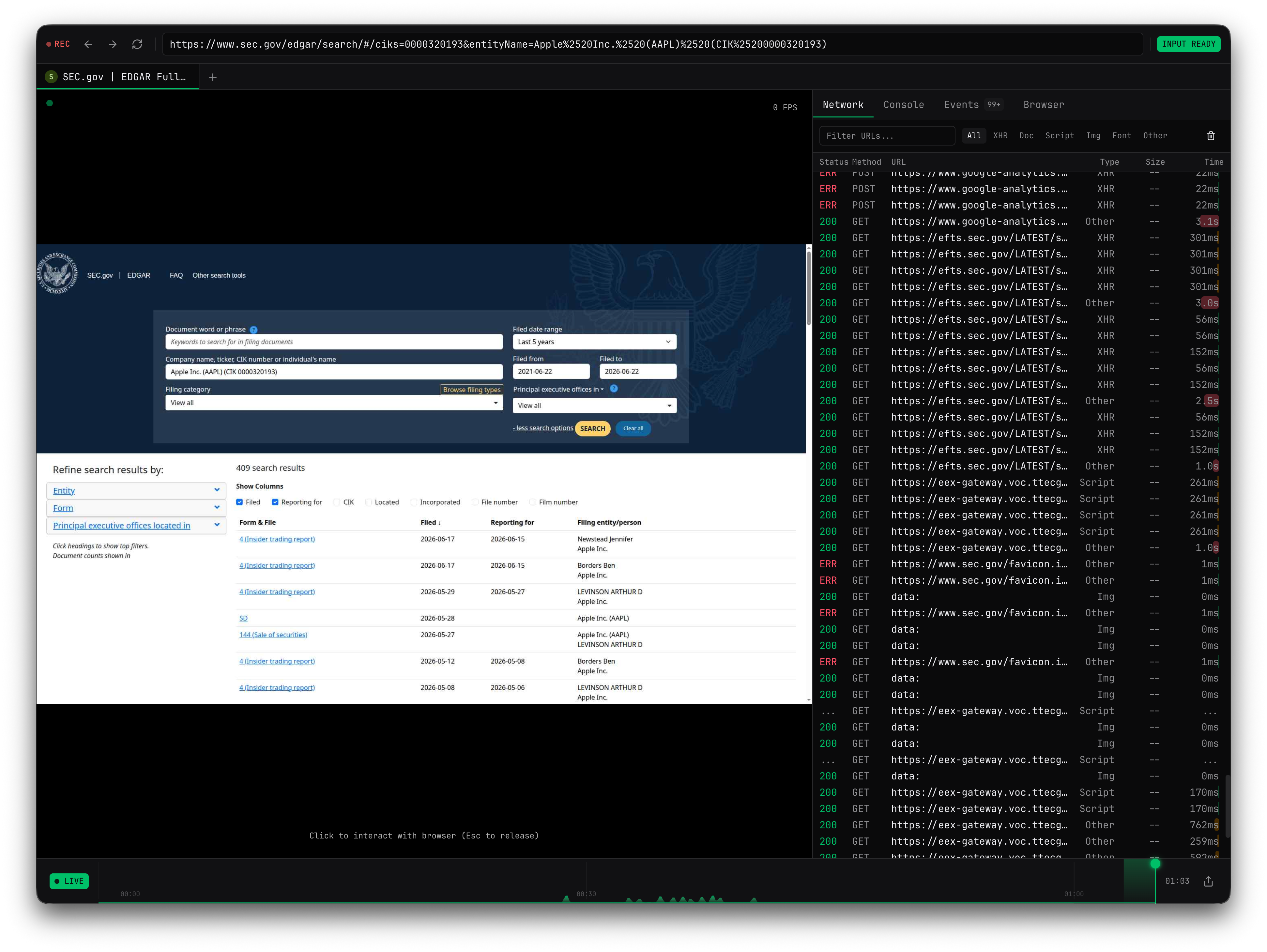
 The screenshot above shows the same inspection surface available for live agent runs: active page metadata, browser readiness, recording state, and timeline events. Recordings can preserve evidence after the browser closes.
The Debug UI link is available only when the browser is still live. A one-shot `web agent` run closes browsers it creates after completion. Use SDK browser creation or SDK `web.agent()` with recording when your workflow needs longer inspection or durable replay evidence.
## If the quickstart does not finish
| Symptom | What to check |
| --------------------------------------- | ------------------------------------------------------------------------------------------------------------------------------ |
| `web agent` cannot find a model profile | Run `web model setup`, or pass `--route`, `--model`, and `--api-key-env` for one command. |
| Provider authentication fails | Confirm the provider key exists in the environment variable named by `--api-key-env`. Do not paste provider keys into prompts. |
| The SEC site changes or blocks the run | Re-run with `--debug-url`, inspect status and page evidence, and report the blocker instead of treating it as success. |
| No Debug UI URL appears | Add `--debug-url`; Webcompute does not print signed live-browser URLs unless you ask for them. |
| You need the browser to stay open | Move the workflow into the SDK and create the browser explicitly. |
## Next steps
Decide whether to use CLI agent, SDK agent, MCP, REST, CDP, quick actions, or advanced exact control.
Learn what the CLI, SDK, MCP, REST, and quick actions return.
Learn model profiles, domain boundaries, schemas, secrets, approvals, and live inspection.
Run an agentic workflow with fields, boundaries, JSON output, and blocker guidance.
Build agentic workflows into applications, backend services, and recurring automations.
Use live sessions, recordings, status, events, downloads, and errors when a run needs evidence.
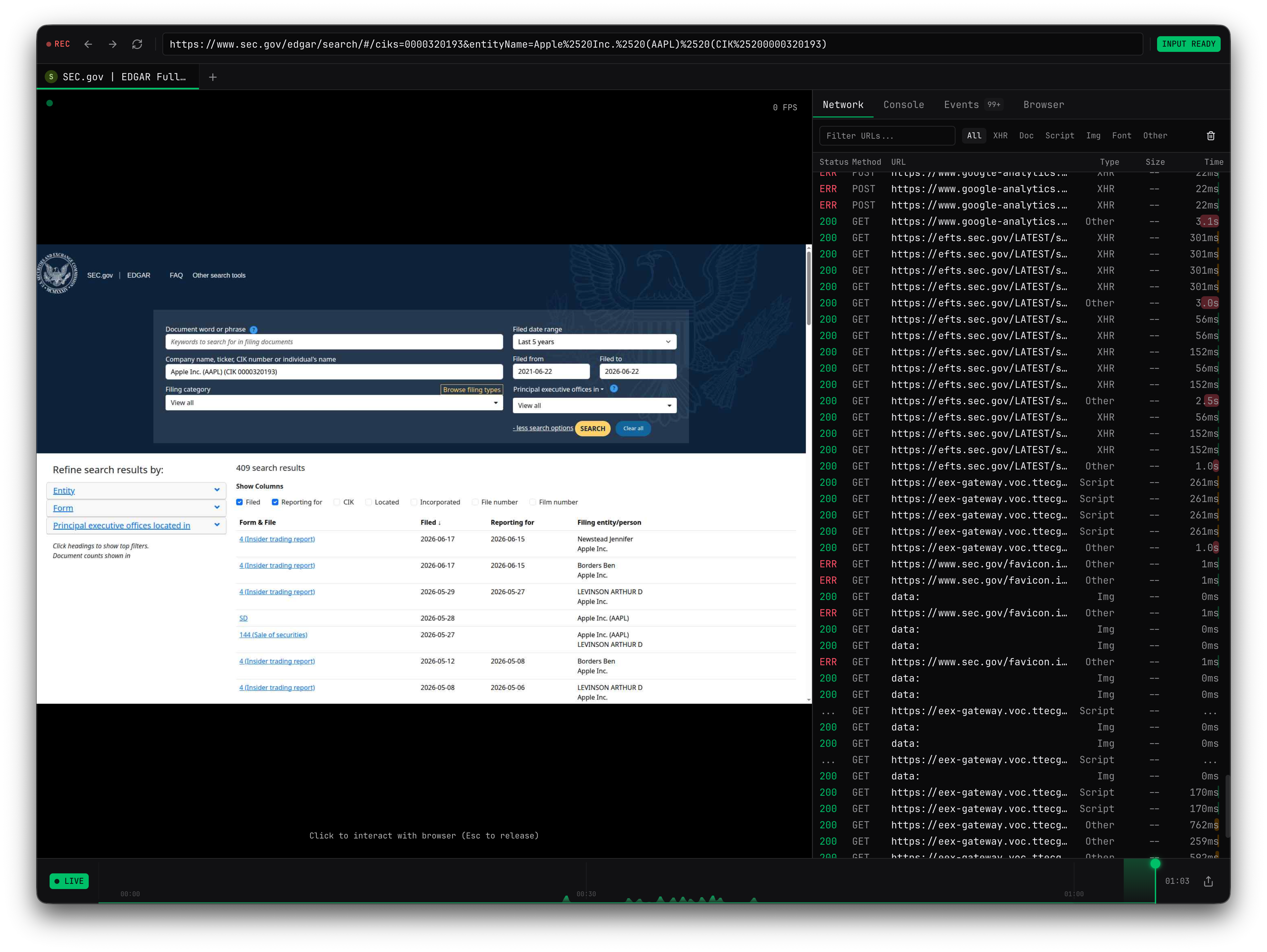
The screenshot above shows the same inspection surface available for live agent runs: active page metadata, browser readiness, recording state, and timeline events. Recordings can preserve evidence after the browser closes.
The Debug UI link is available only when the browser is still live. A one-shot `web agent` run closes browsers it creates after completion. Use SDK browser creation or SDK `web.agent()` with recording when your workflow needs longer inspection or durable replay evidence.
## If the quickstart does not finish
| Symptom | What to check |
| --------------------------------------- | ------------------------------------------------------------------------------------------------------------------------------ |
| `web agent` cannot find a model profile | Run `web model setup`, or pass `--route`, `--model`, and `--api-key-env` for one command. |
| Provider authentication fails | Confirm the provider key exists in the environment variable named by `--api-key-env`. Do not paste provider keys into prompts. |
| The SEC site changes or blocks the run | Re-run with `--debug-url`, inspect status and page evidence, and report the blocker instead of treating it as success. |
| No Debug UI URL appears | Add `--debug-url`; Webcompute does not print signed live-browser URLs unless you ask for them. |
| You need the browser to stay open | Move the workflow into the SDK and create the browser explicitly. |
## Next steps
Decide whether to use CLI agent, SDK agent, MCP, REST, CDP, quick actions, or advanced exact control.
Learn what the CLI, SDK, MCP, REST, and quick actions return.
Learn model profiles, domain boundaries, schemas, secrets, approvals, and live inspection.
Run an agentic workflow with fields, boundaries, JSON output, and blocker guidance.
Build agentic workflows into applications, backend services, and recurring automations.
Use live sessions, recordings, status, events, downloads, and errors when a run needs evidence.